

A new client says yes. From the outside, it’s one moment. Inside the business, it sets off a client onboarding process that can touch more tools, more people and more handoffs than anyone has ever counted. Often nobody has counted, because each step was added on its own, by someone solving a real problem on the day.
This post walks through what that can look like, and gives you a simple way to count it in your own business.
What does a typical client onboarding process look like?
The example below is a composite, not a specific client. It’s the kind of sequence that builds up naturally in a service business with a small team and a few years of growth behind it.
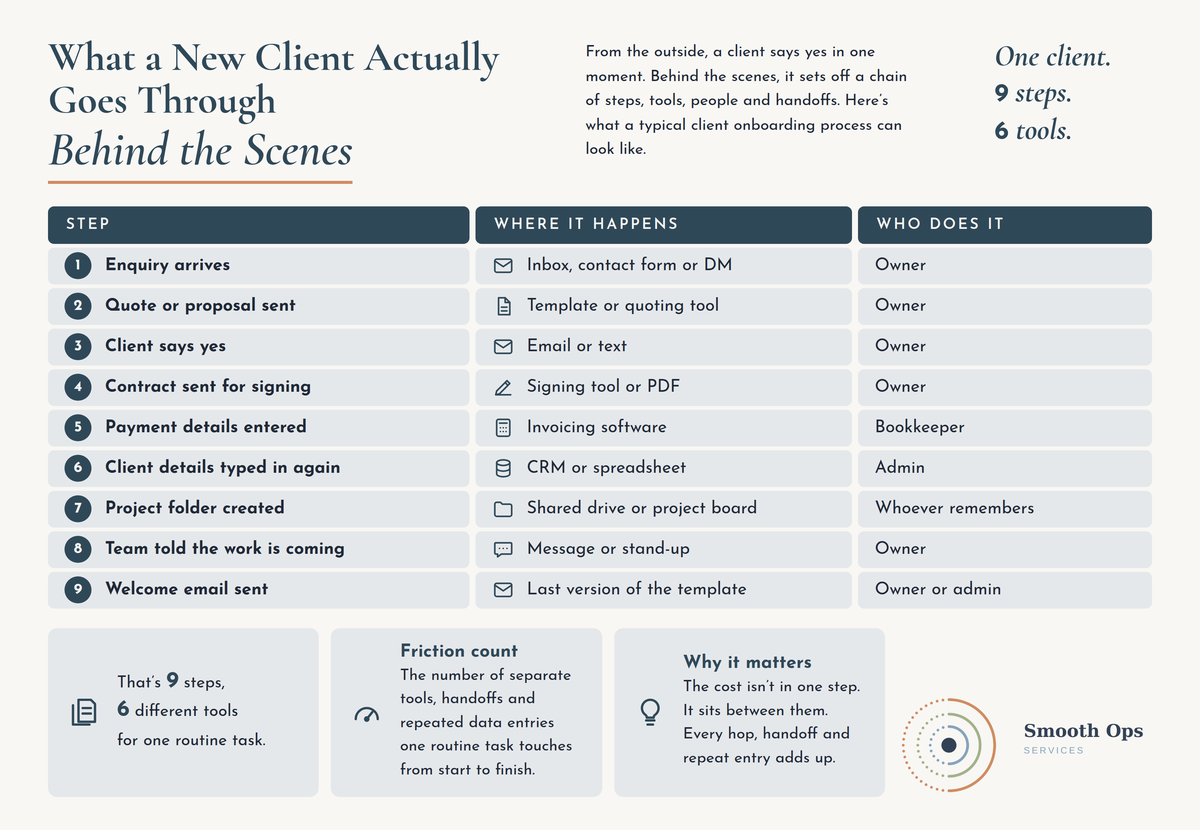
That’s eleven steps, eight different places and four or five people, for one routine task. Nothing on that list is unreasonable on its own.
Friction count: the number of separate tools, handoffs and repeated data entries one routine task touches from start to finish. It’s a simple way to make “this feels clunky” visible.
Why the friction count matters more than any single step
The cost of a process like this rarely sits in one step. It sits between them. The same client details get typed three times. Someone waits for a reply before they can do their part. Someone else asks, “has anyone sent the welcome email?”
There’s also a cost to simply moving between tools. A Harvard Business Review study of 137 people across three large companies found they switched between applications roughly 1,200 times a day, and spent just under four hours a week reorienting themselves after those switches. Those were Fortune 500 teams, not small businesses, so the numbers don’t translate directly. But the underlying point does: every hop between tools carries a small cost, and a process that hops between eight places pays it every single time it runs.
In a growing business, onboarding runs more often each month. So the friction grows with you, quietly.
How do you count the friction in your own client onboarding?
You don’t need software for this. You need one recent client and about half an hour.
Pick one real client from the last month. Trace what actually happened, not what’s supposed to happen.
List every step, the tool or place it happened in, and who did it.
Mark every time the same information was entered again. Name, email, address, job details.
Mark every handoff where someone had to be told, chased or reminded.
Note anywhere the client was waiting on you.
Add it up. You now have a friction count, and a much clearer starting point than “onboarding feels a bit messy”.
What to do with the number
The instinct is often to buy a tool that promises to do it all. Before that, there’s usually simpler work to do:
Remove before you automate. Look for steps that only exist because of another step, like copying CRM details into a spreadsheet. Some can simply stop.
Give each step one owner. A step owned by “whoever remembers” is the one that gets missed.
Decide where client details live. One source of truth, and everything else reads from it.
Then look at automation. Once the process is simpler, connecting your CRM to your accounting software, or sending the welcome email automatically, may make a lot of sense. If AI is part of that conversation, What to Sort Out Before You Touch an AI Tool covers what to get in place first.
Why onboarding is worth getting right
For many clients, onboarding is their first real experience of how you work. A smooth start sets the tone. A start where they’re asked for the same details twice sets a different one.
It’s also one of the most repeatable processes in a service business, which makes it one of the best places to start simplifying. Fix it once and it pays off with every new client.
If it’s less about onboarding and more that everything feels stretched, What We Check When a Business Says “We’re Just Too Busy” looks at the bigger picture. And if you’d like a second set of eyes, mapping processes like this one is part of what we do in an Ops HealthCheck Audit.